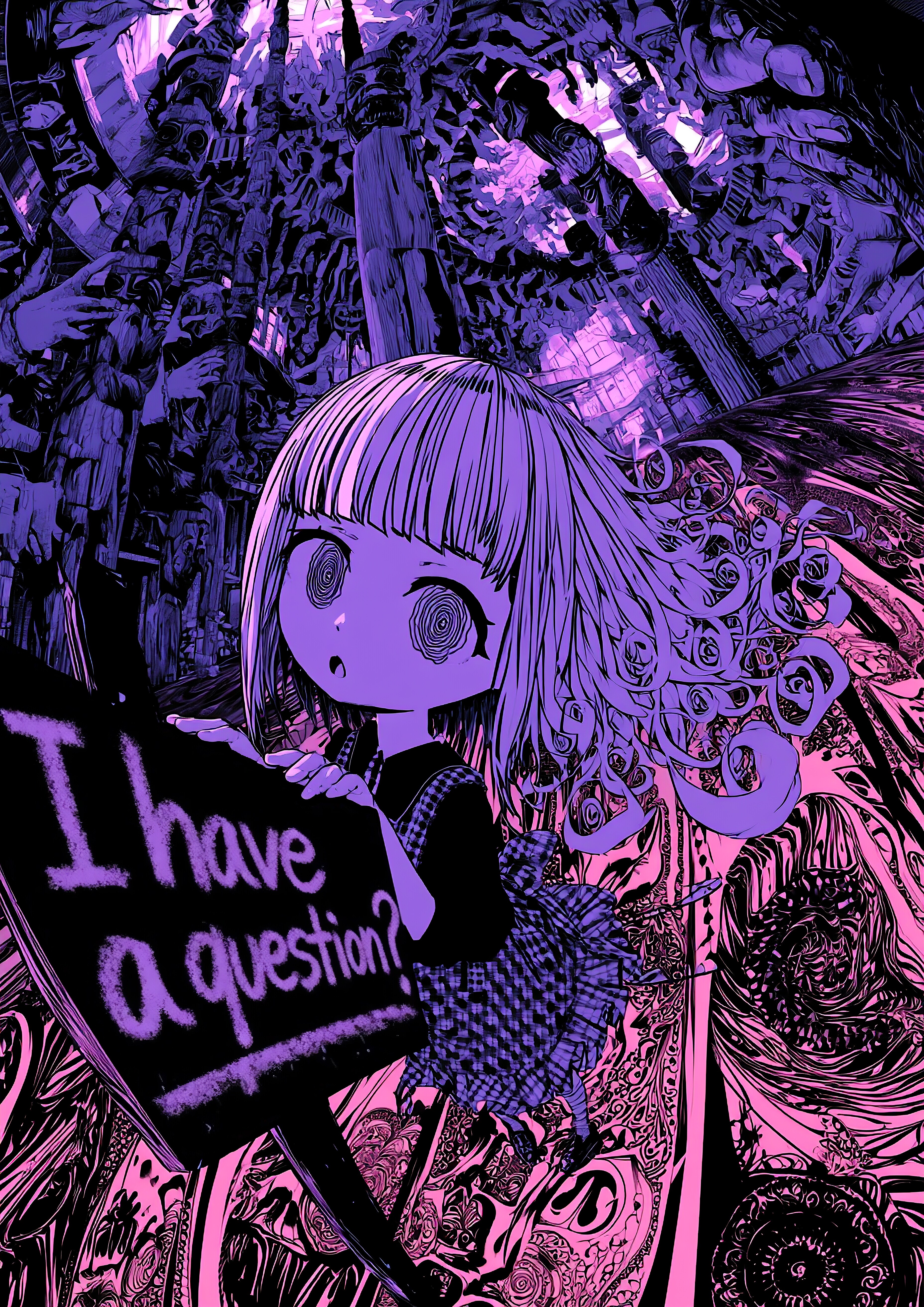
質問があるのですが?|I Have a Question?
Thinking about posting illustration prompts on X as a thread. Would you be into that?
*
と、Xでみなさんにご相談したときに投稿したイラストです。
This is the illustration I posted when I asked everyone on X about it.
(Model)
t2i: Midjourney V8.1
i2i: Grok V4.3
(Size)
3712 x 5248 pixels
(Upscaler)
[Layer_Fix] unlimited waifu2x *4x / Model: swin_unet - photo / DeNoise: None / Tile: 640, Shuffle / TTA: 0 / Alpha Channel: Disable [Layer_Main] DeNoise: Low
(Last Seed)
1667740475
(i2i Count)
2 times / Whole conversion by subtle remix, Text revisions.
(Manual Adjustment)
Merging changes, Handwritten, Sharpness
Prompt:
[t2i by Midjourney V8.1]
semi realistic under world town, indoor of distorted japanese-style pilotis, fisheye lens composition, picture book style chaotic collage, bold diagonal split composition, extremely complex patterns, kawaii slender chibi cubism model of vr chat, wearing check patterned pinafore flutter in the breeze, lean forward and rest hands on the signpost with in scrawled handwriting: "I have a question." in a dark room, many totem poles stand tall, puzzled expression, wavy eyes, look away, dramatic and dynamic tilt angle, many beast arms background, a wall built by many hands, many arms surround her, dark weirdcore, vibrant silver, striking color scheme, limited palette, macabre zentangle, intricate patterned transparent smooth marbling, long messy hair, curled hair at the ends, blunt bangs, spirals, beautiful perspective, dotted line, ephemeral, glitch, high contrast, extremely detailed, absurdres, highres --v 8.1 --sref 1958468279::3 1256473810::2 2770257201::1 2303749492::1 637741383::2 3635554940::2 2374731863::3 3289275409::1 3304104388::1 298143307::3 437996816::5 2739872721::5 3585218771::5 --sw 50 --sv 6 --s 70 --ar 5:7
[i2i by Grok V4.3]
Changed the text on the standing sign, "I have a question?", to bold handwritten lettering in crayon.
![【曲】あっち #61|[Song] That Way #61](https://chichi-pui.akamaized.net/uploads/membership/image_post_images/originals/562c0d97-03c8-4361-bcf3-31122ac5a955/2574779e-0e56-4f35-85ad-dd7fbc055ba6.jpg?impolicy=thumbnail&w=400&h=210.0&x=2942&y=1643)
【曲】あっち #61|[Song] That Way #61
全体公開
下記楽曲のアートワークとして制作しました。 Created as artwork for the music video below. ⬇↘⬊⇔↶ https://youtu.be/OvXnmUtUCP8 (Model) Midjourney V8.1 (Size) 5884 x 3292 pixels (Upscaler) unlimited waifu2x *2x / Backend: WebGPU / Model: swin_unet - photo / DeNoise: Medium / Tile: 640, Shuffle / Alpha Channel: Disable (Last Seed) 3934988473 (i2i Count) 0 time (Manual Adjustment) Sharpness Prompt: abstract, many long arrow symbols, summer fluorescent light, vibrant, pop, complex collage, realistic smooth marbling, ripples on graph paper, distortion, melting, dotted, ground and underwater, submerged, many randomize arrow symbols and transparency moths, tactiles, closed wings, spiral patterns, look away, a diverse array of glitch effects made from giant tiles, clear white, colorful, beautiful and ephemeral, high contrast, niche character design, kawaii chibi moth girl, hair made moths, wavy eyes, look away, flat illustration, intense marbling, complex patterned zentangle background, portrait, a moth lands on index finger, dynamic angle from oblique side, bright colors, wearing kente patterned dress, moth scales fluttering in the air, child's body proportions, nostalgic --v 8.1 --sref 1958468279::3 1256473810::1 2303749492::1 2770257201::1 779819511::1 2361630497::2 2690515967::1 970460098::2 657749254::2 --sw 175 --sv 6 --s 175 --ar 16:9 --hd
![【曲】あっち #60|[Song] That Way #60](https://chichi-pui.akamaized.net/uploads/membership/image_post_images/originals/652f2c51-f3ba-4d84-b245-91149d2b9bf6/578c8ce7-96ef-495b-ae2e-a81b750baf08.jpg?impolicy=thumbnail&w=400&h=210.0&x=2944&y=1750)
【曲】あっち #60|[Song] That Way #60
全体公開
下記楽曲のアートワークとして制作しました。 Created as artwork for the music video below. ⇋⬊↑↱⇵ https://youtu.be/IZnra1_chSw (Model) Midjourney V8.2 (Size) 5888 x 3296 pixels (Upscaler) unlimited waifu2x *2x / Backend: WebGPU / Model: swin_unet_v3 - Art / DeNoise: None / Tile: 640, Shuffle / Alpha Channel: Disable (Last Seed) 1946653550 (i2i Count) 0 time (Manual Adjustment) Merging 3 variations, Sharpness Prompt: complex,flat, inside cityscape with depth, surreal feel stylish collage, distorted graph paper, dotted, transparency, kawaii lost child who looking for a way in the distance, numerous viewpoints make one town, traffic sign, pop design, zentangle background, monochrome, two-tone coloring, exquisitely detailed, beautiful aesthetic, absurdres, highres --raw --s 80 --v 8.2 --p wnrrlfx --sref 1958468279::3 1256473810::2 2770257201::1 2303749492::1 637741383::2 3635554940::2 2374731863::3 3289275409::1 3304104388::1 298143307::3 --sw 40 --ar 16:9 --sv 6 --hd --seed 1946653550
![【曲】サキュバスは夜を失くした|[Song] Succubus Lost Her Night](https://chichi-pui.akamaized.net/uploads/membership/image_post_images/originals/5ace5bb5-4aab-4e62-8089-4144233cbd29/2055f6ec-4638-4a53-8f6d-b83a63ff59a0.jpg?impolicy=thumbnail&w=400&h=210.0&x=2944&y=1545)
【曲】サキュバスは夜を失くした|[Song] Succubus Lost Her Night
全体公開
夜はこない? Will night ever come back? * 下記楽曲のアートワークとして制作しました。 同名シリーズのイラストの元になった曲です。 自作曲をAIでアレンジ後、作編曲・ミックスして仕上げました。 Created as artwork for the music video below. This is the track that inspired the illustration series of the same name. I arranged my original composition with AI, then refined the composition, arrangement, and mix by hand. https://youtu.be/V_pLCwGzeKk (Model) Midjourney V8.2 (Size) 5888 x 3296 pixels (Upscaler) unlimited waifu2x *2x / Backend: WebGPU / Model: swin_unet - photo / DeNoise: None / Tile: 640, Shuffle / Alpha Channel: Disable (Last Seed) 767899878 (i2i Count) 0 time (Manual Adjustment) Merge 3 variations, Handwritten, White balance, Sharpness Prompt: A slender succubus girl standing across from the single bed in a hotel bedroom, open the curtains with one hand and staring expressionlessly at the beautiful fragmental city’s distorted 16k transparent nightscape outside. An extremely dynamic tilted shot taken from just behind below the close-up face. Looking up at the tops of the skyscrapers towering outside the window. Dramatic contrast of backlighting and shadow created by chiaroscuro. Bare light bulbs hanging from night sky. tilted vertical stripe and window blinds background, exquisitely detailed kawaii modern cartoon style surrealistic photograph, drawn with delicate fine lines, bold tilted composition, carm colors and vibrant solid colorful dots, blunt bangs, coquettish, wing, tail, horn, half opened large eyes, wearing open back short-sleeved and short-legged cute pajamas, absurdres, highres --raw --s 120 --v 8.2 --p wnrrlfx --sref 1958468279::3 1256473810::2 2770257201::1 2303749492::1 637741383::2 3635554940::2 2374731863::3 3289275409::1 3304104388::1 298143307::3 3905775254::3 707737553::1 --sw 30 --ar 16:9 --sv 6 --hd --exp 10
![【曲】あっち #59|[Song] That Way #59](https://chichi-pui.akamaized.net/uploads/membership/image_post_images/originals/ad0fcfe8-0dc1-4688-8d08-e6ff471e37c2/7ee00372-1bcf-4f74-a583-a760166163f2.jpg?impolicy=thumbnail&w=400&h=210.0&x=2944&y=1638)
【曲】あっち #59|[Song] That Way #59
全体公開
下記楽曲のアートワークとして制作しました。 Created as artwork for the music video below. ↝↝↘↑ https://youtu.be/8y2POvS_YTc (Model) Midjourney V8.2 (Size) 5888 x 3296 pixels (Upscaler) unlimited waifu2x *2x / Backend: WebGPU / Model: swin_unet_v3 - Art / DeNoise: Low / Tile: 640, Shuffle / Alpha Channel: Disable (Last Seed) 3803296444 (i2i Count) 0 time (Manual Adjustment) Handwritten, Sharpness Prompt: fractured illusion: abstract modern cubism of a face, distorted and deformed, slightly tilted head, set against vertical stripe arrow symbols background, strong brush strokes create a powerful portrait, mixed media bold composition, textures, focusing only on the head, rabbit girl, muted clear colors, blunt bangs, bow, coquettish, exquisitely detailed kawaii cartoon style, absurdres, highres, 16k --raw --s 120 --v 8.2 --p wnrrlfx --sref 1958468279::3 1256473810::2 2770257201::1 2303749492::1 637741383::2 3635554940::2 2374731863::3 3289275409::1 3304104388::1 298143307::3 --sw 40 --ar 16:9 --sv 6 --hd
他のクリエイターの投稿

 7
7
ブルーダリアちゃん
100コイン/月以上支援すると見ることができます

ミラ
 35
35
いろいろ
500コイン/月以上支援すると見ることができます

いち
 16
16
第3章「古代遺跡で大騒ぎ」①
全体公開

ゆうこう
 2
2
フォトジェニック・ガールズ
100コイン/月以上支援すると見ることができます

rakia20002000
 34
34
【センチ~if~】永倉えみる:高〇生時代③~冬デート・光のページェント~
100コイン/月以上支援すると見ることができます

るんぽす

10月のゲスト
100コイン/月以上支援すると見ることができます
ミラ
 27
27
いろいろ
500コイン/月以上支援すると見ることができます
いち
【曲】あっち #61|[Song] That Way #61
全体公開
下記楽曲のアートワークとして制作しました。 Created as artwork for the music video below. ⬇↘⬊⇔↶ https://youtu.be/OvXnmUtUCP8 (Model) Midjourney V8.1 (Size) 5884 x 3292 pixels (Upscaler) unlimited waifu2x *2x / Backend: WebGPU / Model: swin_unet - photo / DeNoise: Medium / Tile: 640, Shuffle / Alpha Channel: Disable (Last Seed) 3934988473 (i2i Count) 0 time (Manual Adjustment) Sharpness Prompt: abstract, many long arrow symbols, summer fluorescent light, vibrant, pop, complex collage, realistic smooth marbling, ripples on graph paper, distortion, melting, dotted, ground and underwater, submerged, many randomize arrow symbols and transparency moths, tactiles, closed wings, spiral patterns, look away, a diverse array of glitch effects made from giant tiles, clear white, colorful, beautiful and ephemeral, high contrast, niche character design, kawaii chibi moth girl, hair made moths, wavy eyes, look away, flat illustration, intense marbling, complex patterned zentangle background, portrait, a moth lands on index finger, dynamic angle from oblique side, bright colors, wearing kente patterned dress, moth scales fluttering in the air, child's body proportions, nostalgic --v 8.1 --sref 1958468279::3 1256473810::1 2303749492::1 2770257201::1 779819511::1 2361630497::2 2690515967::1 970460098::2 657749254::2 --sw 175 --sv 6 --s 175 --ar 16:9 --hd

miya
 18
18
午後眠いけど、がんばろうね
100コイン/月以上支援すると見ることができます

hijiki

10月のゲスト
100コイン/月以上支援すると見ることができます
ミラ
 2
2
蜜月宮
100コイン/月以上支援すると見ることができます
rakia20002000
 7
7
ComfyUIでラインを整理する
全体公開
今回はワークフローの接続ライン(線)を整理するノードの紹介です。 以前「ComfyUIでデティールアップしよう」↓で「ToBasicPipe」ノードを紹介しましたが、それと似たノードです。 https://membership.chichi-pui.com/posts/images/d47ba55c-1bfc-4e4f-9651-4b49e84914fc/ 画像1 使用したカスタムノード ・rrgthree-comfy URL: https://github.com/rgthree/rgthree-comfy Context (rgthree) 見ての通り、複数の項目を1本のラインに乗せて次のノードへ届ける事が出来ます。 また、in と out が同じノード上にあるので、集線端子的な使い方も出来ます。 デイジーチェーンが可能です。 画像2 使用したカスタムノード ・ComfyUI-Crystools URL: https://github.com/crystian/ComfyUI-Crystools 🪛 Pipe to/edit any 🪛 Pipe from any 「🪛 Pipe to/edit any」と「🪛 Pipe from any」で対に成るノードです。 入力に指定が無くどの項目でも繋げます。 これも、デイジーチェーンが可能です。 なお、in と out は1対1で対応しているので、途中で違う項目を繋いだら内容が変わりますので、注意して下さい(画像3で入力と出力の文字列の違いに注目して下さい)。 画像4~6 実際に使った例です(上下2段に分かれているのは、使用しているKサンプラーの違い)。 生成後に目のデティールアップを行っています。 画像4は、全体の繋がりです。 画像5は、余り変更しないローダー、設定関係のノードを左端に纏めたものです。 画像6は、「ToBasicPipe」を併用したimpact_packのKサンプラーを使った例です。 画像7は、標準のKサンプラーを使った例です。 上段、下段どちらが良いかは、好みです。 お好きなやり方でワークフローを組み立てて下さい。

22(にゃんにゃん)
 7
7
ブルーダリアちゃん
100コイン/月以上支援すると見ることができます
ミラ
 18
18
【センチ~if~】永倉えみる:高〇生時代①~通学路は一緒に~
100コイン/月以上支援すると見ることができます
るんぽす
 6
6
紅葉の名所でフォトショット
100コイン/月以上支援すると見ることができます

P.S.T.A.
 7
7
ブルーダリアちゃん
100コイン/月以上支援すると見ることができます
ミラ